
Run a workflow in HumanLayer
Use this guide to start a workflow, review each phase, and finish the task. HumanLayer prompts you for the choices it needs and manages the skills that run each phase.
For the reasons behind the phase model, read How workflow phases fit together. For advanced commands and exact skill behavior, read the skills and workflows reference.
If your task starts from a ticket, first connect GitHub, Linear, or Jira. Return here after you select the ticket to choose a workflow.
Select a workflow for the task
When you create a task, HumanLayer asks which workflow to use. Select the shortest workflow that gives you the review points you need.
| Your task | Workflow |
|---|---|
| The change is small and the correct result is clear | Oneshot |
| The change needs research and one combined design discussion | RPI |
| The change needs separate product and technical designs | PRD-Oriented |
| The task does not need fixed phases | Freeform |
Use Oneshot for tasks such as a copy change, a small script, or a bug with a clear cause. Use a planned workflow when a wrong design would cause costly code changes.
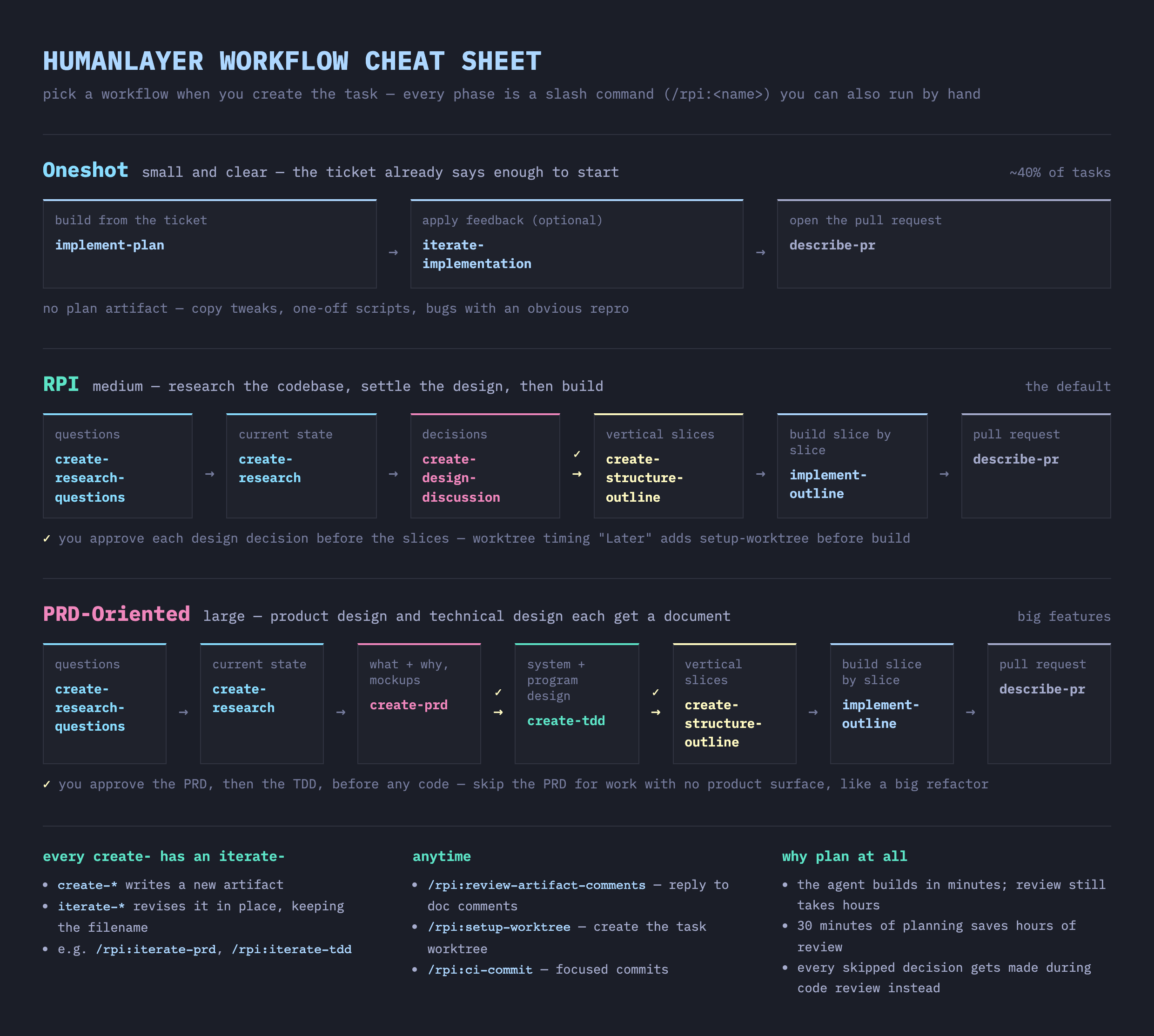
View the light-mode version · Download the printable version
The infographic shows the three guided workflows. Freeform has no fixed phases.
Start the workflow
- Create a task in HumanLayer.
- Select Oneshot, RPI, PRD-Oriented, or Freeform.
- Select the worktree timing.
- Start the first session.
For example, start a task with this prompt:
Fix task retries so a worker restart does not lose them.HumanLayer starts guided RPI and PRD-Oriented tasks with research questions. Oneshot starts implementation from ticket.md. Freeform does not set fixed phases.
Select Now to create the workspace before the first session. Select Later to create it before implementation. Select Never to use the current checkout. Oneshot treats Later as Never. See Worktree timing for exact behavior.
Move to the next phase
When a phase finishes, HumanLayer saves its artifact and shows the next action.
Review the artifact.
Add comments or give feedback if a decision or fact is wrong.
textUpdate the design discussion to use one shared queue instead of one queue per worker.Continue in the current session if enough context remains. Ask the model to update the artifact directly.
Before you switch sessions, write every current decision from this session into the artifact.
If the artifact needs more work and the current session has used much of its context, start a new session with the matching
/rpi:iterate-*skill. Include your feedback in the prompt.text/rpi:iterate-design-discussion add the retry limit we agreed on and resolve the open queue questionWhen the artifact is ready, use the next action that HumanLayer shows.
Some transitions can start automatically. Design and outline handoffs always wait for you. See Next steps and auto-advance for exact transition rules.
Change a plan during the workflow
Continue in the current session if enough context remains. Ask the model to update the artifact directly.
Update the outline so Phase 2 includes the API route check.Before you switch sessions, write every current decision from this session into the artifact. If the artifact, code, or tests need more work and the current session has used much of its context, start a new session with the matching /rpi:iterate-* skill. Include your feedback in the prompt.
/rpi:iterate-implementation fix the empty-state bug and add a regression testYou can end a design discussion when it resolves all required choices. HumanLayer then offers the structure outline as the next action.
/rpi:create-outline turn the approved design into testable implementation phasesLater artifacts take priority when artifacts disagree. The artifacts and precedence reference gives the exact order.
Finish the workflow
When the implementation is ready for review, use the pull request action that HumanLayer shows. This phase checks the full branch diff and opens or updates the pull request.
/rpi:describe-prSee PR output for its exact outputs and large-pull-request behavior.